Physical Cartridges for GB/GBC
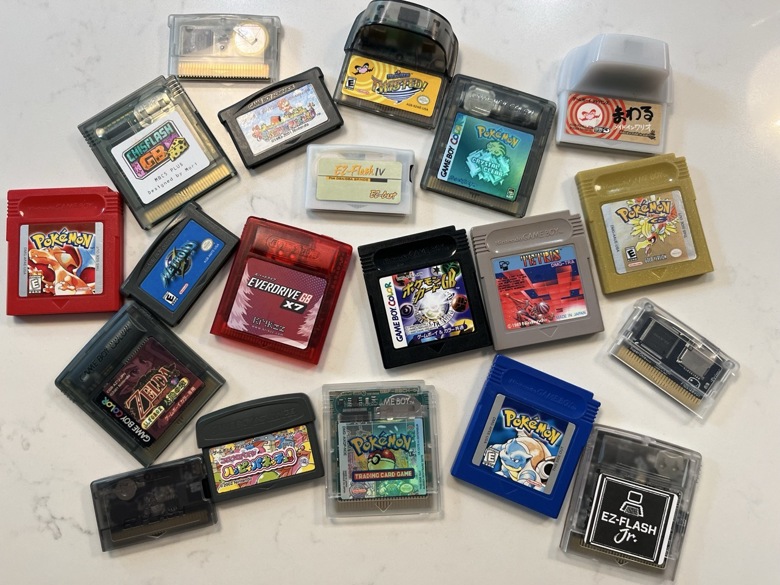
There are multiple ways to play games on a physical Game Boy or Game Boy Color. This basic guide covers the pros and cons of each method to help you decide which option works best for your needs and budget.
1. Official Cartridges
Prices are steep due to collector demand. Japanese cartridges offer a more affordable alternative and there are a few that are playable without Japanese literacy—especially puzzle games, platformers, and recognizable titles like Mario, Kirby, and Tetris.
2. Reproduction Carts
Cost: $5–10 each Pros: Affordable, readily available all over AliExpress, example Cons: Quality is inconsistent; save file corruption is common. Always read seller and product reviews before purchasing. Some of these reproduction carts can be rewritten with a burner device as well (see below).
3. Rewriteable Flashcarts with Burner Device
Cost: ~$30-35 per rewriteable cart + $30 burner device such as GBXFlash
How it works: The burner device connects to your computer via USB, allowing you to flash different games onto the same rewriteable cart. Rewriteable carts come in many varieties. I highly recommend ChisFlash family of carts (MBC5 cart, or one with RTC) as they tend to be more affordable. Save files can be managed and backed up on your PC. Having a burner device allows you to also dump official cartridges and store/manage save files on a computer. This option also opens up the ability for ROM patching for translated games and romhacks.
4. microSD-Based Flashcart How it works: Load ROMs onto a microSD card, insert the card into the flashcart, and play. No computer required after initial setup. Similar to option 3, you can manage save files and patch ROMs.
Quality tiers:
Budget knock-offs
- “OSV4”/Game Boy GB Pro and other clones found all over AliExpress, $20-30 + microSD card cost (higher compatibility issues, faster battery drain)
Mid-tier
- EZ-Flash Jr. $60: (fewer compatibility issues, moderate battery drain, real-time clock (RTC) for day/night games like Pokémon Crystal
- Everdrive GB-X5 $60: zero compatibility issues, low battery drain, but no RTC
Premium
- Everdrive GB-X7 $135: zero compatibility issues, RTC support, save states
Bonus feature of the above microSD flashcarts include a reboot button on the cartridge, eliminating the need to physically power off your Game Boy to reset the system. The Everdrive GB-X7 also adds a single save/load state slot that activates via the same button, making it easy to soft reset for specific in-game events—extremely useful for activities like hunting for Pokémon with specific stats or nature.
Power Consumption: Options 1–3 are significantly more power-efficient and won’t impact your Game Boy’s battery life noticeably. Option 4 consumes more device battery and, particularly with cheaper models, may require periodic button battery replacements in the cartridge itself.
My Recommendation:
- Best overall: GB-X7 flashcart (#4) at $135—handles all games flawlessly and includes RTC support plus the save/load state feature, allows you to manage save files, and patch ROMs with translations/romhacks.
- Best value: Rewriteable flashcart + burner (#3) at ~$60—excellent performance with room to expand later by purchasing additional rewriteable carts. Allows save file management and ROM patching.
Heads up: this post contains affiliate links. If you click through and buy something I may earn a small commission at no extra cost to you. See the About page for the full disclosure.